Editable 2024 Work from Home Planner KDP: A Practical Look at Customization and Fit
Remote and hybrid professionals often discover that generic paper planners cannot keep pace with the fluidity of a home office. The Editable 2024 Work from Home Planner KDP steps into that gap by offering a flexible, design-it-yourself system built for both personal use and commercial publishing. Alongside the Editable 2024 Work From Home Planner For Canva, users receive print-ready files that can be tailored to individual workflow without starting from a blank page. For those comparing digital tools, physical bound planners, and other printable templates, understanding where this resource fits helps clarify whether its blend of Canva editing and KDP-ready output matches your actual planning rhythm.
What This Planner Package Actually Includes
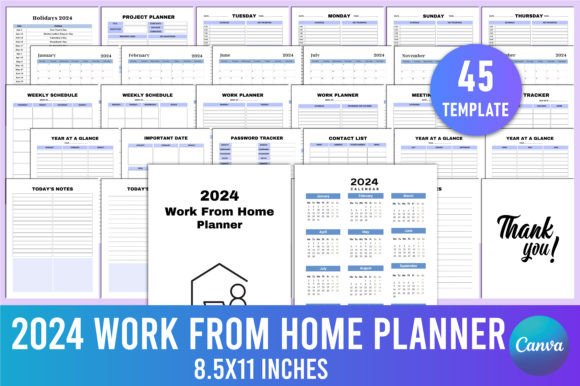
At its core, the offering is a collection of 45 distinct Canva templates formatted at 8.5 x 11 inches, 300 DPI, and CMYK color with no bleed. This technical foundation matters because it means the files are production-ready for Amazon KDP or any professional printing service. You receive an editable Canva link, along with high-quality PDF, JPG, and PNG files—so you are not locked into a single software or format. The interior pages cover the full planning spectrum:
- A Belongs To page for personalization
- Project planner sections and a dedicated monthly calendar (January through December)
- Week-at-a-glance layouts and daily work planning for Monday through Sunday
- Task tracker, meeting notes, and contact list spreads
- Password tracker and important date logs
- Year-at-a-glance reference pages
- Multiple note-taking designs, including Today’s Notes, Important Notes, My Notes, and a standard Notes page
- A Thank You page suitable for published versions
Having such a rich assortment under one editable umbrella sets this planner apart from single-purpose templates. Rather than stitching together disparate PDFs, you work inside one cohesive design system where every page can remain consistent in color, font, and branding—or be reworked entirely to suit a specific remote role.
How an Editable Canva Planner Compares to Pre-Made Options
The planner occupies a middle ground between fully finished, physical planners you unwrap and use immediately, and from-scratch digital solutions like Notion, Trello, or a blank spreadsheet. A bound 2024 planner, for instance, arrives with fixed sections; if your week demands more meeting notes than task checkboxes, you adapt. In contrast, the Editable 2024 Work from Home Planner KDP lets you delete, duplicate, or rearrange pages before printing. For someone who only holds three meetings a week but needs daily deep-work blocks, you can increase the number of daily pages and reduce the meeting notes sections. That level of structural control rarely exists in off-the-shelf planners, and even many printable PDFs force you to accept the designer’s layout priorities.
Digital-only workflows offer their own advantages—searchability, reminders, and integration with calendars—but many people think better on paper or want a physical record away from screens. This planner bridges that divide: you design it digitally, print exactly what you need, and hold a tangible document that mirrors your ideal format. Compared to static, non-editable KDP planner interiors, the Canva link removes the friction of forcing your process into someone else’s template. You can adjust line spacing, swap color palettes to reduce visual fatigue, or add client-specific fields without learning Adobe InDesign.
Strengths That Make It Worth Considering
Flexibility is the headline benefit, but several practical advantages emerge for different types of users. Print-on-demand sellers, for example, gain a commercial license to use the templates as low-content book interiors. The 300 DPI, CMYK, and no-bleed specifications meet KDP standards, drastically reducing the technical guesswork. Instead of hiring a designer or building interiors from scratch, a publisher can customize the 45 pages, brand them, and list a unique work-from-home planner quickly.
For individuals, the editable nature lowers resistance to consistent planning. A user who dislikes rigid time blocks can convert a daily layout into a priority-based list; someone who finds traditional planners too busy can simplify the design to bare essentials. The inclusion of password trackers, contact lists, and meeting notes means fewer separate notebooks or sticky notes floating around a home office. Because you control the final file, you can print a fresh copy weekly, create a bound version for the entire year, or use just the digital PNGs in a tablet annotation app like GoodNotes.
Another strength is the breadth of templates without bloat. While 45 pages could feel overwhelming, the planner organizes them into logical categories. You are not paying for dozens of decorative pages you would never use; instead, you get multiple options for daily, weekly, and note pages, allowing you to choose the two or three that match your cognitive style and discard the rest before printing.
Tradeoffs and Limitations to Keep in Mind
Understanding the constraints helps set realistic expectations. The Editable 2024 Work from Home Planner For Canva requires at least a basic comfort level with Canva. While Canva is user-friendly, someone who has never edited a template may face a learning curve when adjusting text boxes, aligning elements, or exporting in CMYK. The planner does not replace a task management app’s collaboration and sync features; it is fundamentally a paper-first system with digital editing. If your work depends on real-time sharing with a team, a printed planner becomes a personal companion rather than a shared hub.
Printing quality depends entirely on the hardware and paper you use. The files are optimized, but home printers vary widely in color accuracy and bleed handling. For a single copy, this is manageable; for commercial use, a seller must still verify proof prints. Additionally, while 8.5 x 11 inches is standard in North America, users in A4 regions may need to adjust scaling, which can introduce slight layout shifts. The planner does not include niche specialty pages like meal planning or fitness tracking, so if your home office planning spills heavily into personal life management, you might supplement with other resources.
Time investment is another factor. Editing a 45-page document, even with templates, takes longer than buying a pre-printed planner. If your priority is speed and you are satisfied with a generic structure, a ready-made undated daily planner could work with zero setup.
When This Planner Aligns Well With Your Needs
Several scenarios make this planner a particularly strong candidate. First, if you are a KDP creator or a coach selling printed workbooks, the commercial-ready files save dozens of hours. You get a curated set of professional interiors that you can rebrand, mix with your own content, and launch as a product without starting from a blank InDesign file. The variety of daily and note pages means your end customers receive more than a repetitive layout, which can boost perceived value.
Second, if you are a freelancer, consultant, or remote employee whose schedule changes shape from week to week, the mix-and-match approach proves useful. You could print a heavy meeting-notes week followed by a deep-focus week with extra daily pages, all from the same editable source. Unlike dated planners that become wasteful when a project shifts, this system allows you to print on demand, adjusting as you learn what works. The ability to retype section titles—for instance, turning “Meeting Notes” into “Client Call Log”—tailors the tool to your exact vocabulary.
Third, creative professionals or small business owners who value aesthetics often find that generic planners feel impersonal. The Canva templates let you insert your brand colors, logo, and chosen fonts, creating a coherent tool that aligns with visual identity. This is equally relevant for practitioners giving a branded planner to clients.
When Another Approach Might Serve You Better
If you have zero desire to edit anything and simply want a planner that works out of the box, a well-rated physical planner with a fixed structure will be faster. Similarly, if your work revolves entirely around digital task managers with due dates, reminders, and integrations, the paper format may feel like a step backward rather than a complement. People who need robust habit tracking, gratitude prompts, or a full wellness section embedded within their work planner may find the included pages too focused on professional task management; they might look for planners that merge work and personal life in equal measure.
Another situation to monitor is when a team needs a shared planning system. While you could print multiple copies and distribute, synchronization becomes manual. An online tool that connects calendars and assigns tasks across a group would offer more real-time collaboration. The Editable 2024 Work from Home Planner KDP is best viewed as an individual productivity asset, not a team-wide platform.
Deciding Factors: Design, Time, and Purpose
Three variables consistently surface when people evaluate this type of resource. The first is design control. How important is it that the planner matches your visual preferences, uses your preferred section labels, and excludes irrelevant pages? If high, the editable Canva link becomes a significant advantage. If uniform, off-the-shelf design bothers you less, a simpler solution may suffice. The second factor is time investment. You trade setup minutes for a tool that fits more precisely. For someone who spends ten minutes tweaking a template and prints a year’s worth of pages, the trade-off is minor. For someone who might endlessly tweak without printing, the time cost can erode the planner’s value.
The third and perhaps most overlooked factor is purpose. If you intend to publish on KDP, the commercial benefit of 45 ready-to-edit interiors is a core decision driver. The CMYK, no-bleed package reduces technical barriers significantly. But if you are purely a print-at-home user, that same professional spec is a nice extra, not a necessity. Here, the decision rests on whether the breadth of page types and editing freedom justify the price and effort when a simpler set of free printable PDFs exists online. The balance tips toward this planner when you need a self-contained, cohesive, and brandable system rather than a collection of disconnected worksheets.
Realistic Ways People Use This Type of Planner
Seeing how the planner functions in practice helps ground the comparison. A marketing consultant might customize the weekly layout to show Monday client calls, Tuesday content creation blocks, and Wednesday project review. She then prints a spiral-bound version at a local shop, using the meeting notes pages to capture action items. Because she edited the Canva templates once, she can reprint the same refined design every quarter.
A KDP seller could take the 45 templates, add a new cover, tweak the color palette to a neutral warm tone, and publish a “Minimalist Home Office Planner” on Amazon. The seller does not need to design the interior from scratch but still offers a unique product to buyers. Meanwhile, a remote software developer who lives by a digital calendar might use the weekly schedule and daily notes pages solely for offline deep-work planning, discarding the task tracker and password sections. The flexibility to omit unwanted pieces without breaking the layout keeps the planner lightweight and relevant.
These examples underline a central idea: the Editable 2024 Work from Home Planner KDP is less about providing a one-size-fits-all solution and more about giving you the ingredients to build a planner that fits your version of remote work. Its value emerges most clearly for those willing to invest a little time to shape it, whether that means creating a single personalized copy or launching a product line. For users who simply want a quick, predetermined layout, the editing capability may go untapped, and a static printable could feel simpler. Understanding where you fall on that spectrum is the key to deciding if this planner meets your moment.