Effective Meeting Notes: Your Go-To KDP Interior Solution
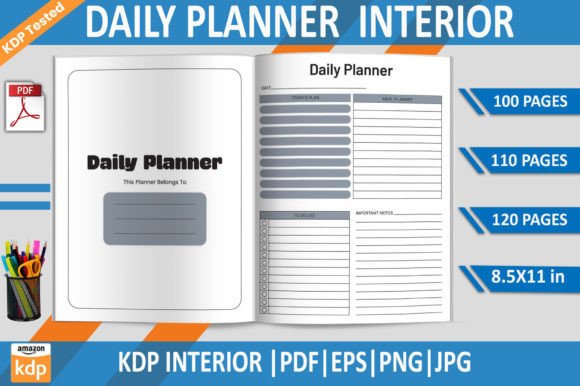
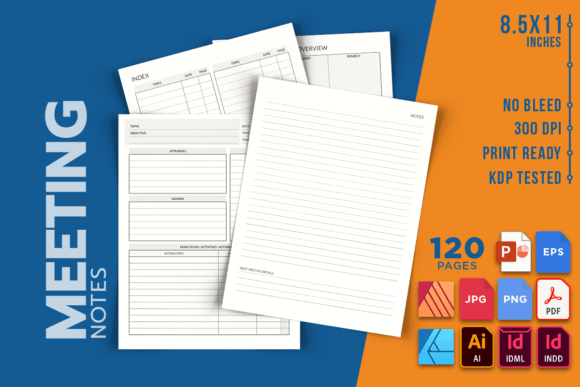
Getting the most out of a meeting—whether it’s a quick stand-up, a client consultation, or a strategic planning session—often comes down to the tool you use to capture ideas, tasks, and decisions. A well-designed meeting notes template transforms scattered scribbles into a clear, actionable record. This is where a dedicated Meeting Notes KDP interior steps in. It’s a pre-formatted, print-ready file crafted for Amazon KDP, made for creators who want to publish a polished notebook or for individuals who simply want a reliable note-taking system at their fingertips. With clean dimensions of 8.5 by 11 inches and 120 pages of thoughtfully structured space, this template eliminates the hassle of designing from scratch. It includes a full set of source files—INDD, IDML, AI, PDF, PNG, JPEG, EPS, AFDESIGN, AFPUB, and even PPTX—so no matter what software you’re comfortable with, you can jump right in. The 300 DPI quality means every line prints crisp and professional, and because it’s a no-bleed design, you won’t need to worry about intricate margin adjustments. The interior is just that—an interior. You supply the cover, making it a flexible starting point for your own branded notebook or a personalized tool you can use at home, the office, or your favorite print shop.
What makes a seemingly simple meeting notes interior resonate with such a wide audience? The answer lies in the single, universal need: clarity. Professionals, educators, small business owners, and even hobbyists who coordinate projects all share the desire to keep discussions organized. Yet they approach the same product from different angles. A freelance graphic designer might view the editable source files as the ultimate time-saver, quickly tweaking the layout to match a client’s branding before uploading to KDP. A startup founder, on the other hand, may care less about customization and more about instant usability—downloading the print-ready PDF, running off copies, and walking into a team meeting with a consistent format that helps everyone align. An online coach or course creator might see this as a value-add, packaging the notebook as a bonus for students. Because the meeting notes interior bridges the gap between raw creative assets and a finished product, it meets the deeply varied expectations that come from different stages of a project or career.
How a Simple 120-Page Layout Solves Different Problems
At first glance, an 8.5 by 11-inch notebook interior seems like a commodity. But the way different audiences prioritize features reveals just how much thought goes into a high-quality template. For a busy marketing manager, the key metric might be speed and reliability. They don’t want to fiddle with design settings; they need a file that opens quickly, prints without errors, and produces consistent results every time they order a batch from their local printer. The provided high-resolution PDF and the assurance of a no-bleed layout directly answer that need. The manager simply sends the file and focuses on preparing the meeting agenda, not the paper it will live on.
Meanwhile, a KDP publisher weighs criteria differently. For them, commercial value and flexibility top the list. The editable source files—especially the INDD, IDML, and AI formats—are what turn a template into a business asset. With these, a publisher can alter headers, tweak spacing, insert a subtle background, or add page numbers to create a completely unique product. They can repurpose the same structure across multiple niche notebooks (think “Sprint Planning Notebook” or “Client Discovery Meeting Log”) simply by changing the cover and minor interior details. The inclusion of AFPUB and PPTX files further lowers the barrier for those who use Affinity Suite or even PowerPoint as their primary design tool. This adaptability means a single purchase multiplies into a small product line without requiring advanced graphic design skills.
For a teacher or academic advisor, presentation and learning value often override everything. They might print the interior as a professional development journal or provide it to students during group work sessions. The clean, uncluttered pages reduce cognitive load, helping learners focus on listening and synthesizing instead of formatting their notes. A hobbyist organizing a community event or a volunteer board would lean toward ease of use and low cost. They can download the interior, print a handful of copies for committee members, and enjoy a more structured gathering—without investing in expensive branded stationery.
When the Source Files Become Your Creative Engine
Beginners occasionally feel intimidated by terms like “editable source file included,” but this meeting notes interior is built to be approachable. A first-time KDP publisher who only knows basic computer skills can open the PDF, verify everything looks good, and upload it directly to Amazon. There’s no need to touch the raw design files. The quality is already tested and formatted for the platform. That alone removes a huge stumbling block, letting a newcomer launch a professional-looking notebook in a fraction of the time it would take to hire a designer.
Intermediate users, such as a blogger or part-time freelancer, often start with the PDF but gradually experiment. They might open the AI or AFDESIGN file to add a simple copyright notice, a QR code linking to their website, or a consistent header with their business name. Because the structure is intact, even small customizations make the notebook feel entirely their own. Advanced designers and experienced publishers extract the most value by treating the template as a springboard. They can deconstruct the layer organization, adapt the margins for a different paper size, or blend elements from multiple file types to build a branded stationery collection. The provided EPS format allows for easy integration into complex design workflows, while the PPTX version offers a surprisingly rapid editing environment for those who think in slides rather than spreads.
Practical Applications Across Daily Workflows
Understanding the technical specs is one thing; seeing how the meeting notes interior slides into real life is what solidifies its usefulness. Take a freelance consultant juggling multiple clients. In the morning, they might use a printed copy to guide a discovery session, using the open layout to sketch a process flow while still capturing bullet points. In the afternoon, that same notebook travels to a coffee shop where they review previous meeting outcomes and draft a proposal. The 120-page count gives ample room for weeks of consistent work without feeling bulky.
A small café owner who hosts monthly planning meetings with a tiny team could print a dozen copies of the interior at a local print shop, bind them simply, and hand them out as meeting journals. The no-bleed design ensures the copy shop doesn’t need to trim, saving both time and a few extra dollars. An online community manager might use the template differently: they fill out a digital version on a tablet during virtual meetings, then archive the annotated PDFs in a shared drive. The high DPI ensures that even on a screen, the text fields are crisp and easy to read when projected.
Educators often find that standard notebooks overwhelm students with irrelevant formatting. By using this meeting notes interior as a base—perhaps editing the PPTX to add a few guiding questions—they create a structured listening guide. Instead of a blank page, students get gentle prompts like “main topic,” “action items,” and “questions to follow up on.” This turns passive notetaking into active engagement.
Finding Your Fit with the Right Interior
Not every product suits every person, and being honest about that helps you decide quickly. If your primary need is a fully bound, hardcover journal that you can buy off the shelf, this interior doesn’t replace that—it enables you to create it. If you never run meetings, rarely jot down group ideas, and prefer unstructured scratch paper, then a specialized meeting notes layout might feel too confining. But if you frequently find yourself scrambling for a consistent format, if you want to turn a useful tool into a product for sale, or if you simply appreciate the ease of opening a file and printing a professional notebook immediately, the value becomes clear.
Consider whether you value long-term usefulness over a one-time convenience. A template that gives you unlimited personal print runs or the ability to publish recurring batches on KDP is fundamentally different from buying a single consumable notebook. For a small business owner building a brand ecosystem, that difference matters. The meeting notes interior can become a branded lead magnet, a conference giveaway, or a low-cost upsell that pairs with an online course. Its reusability turns a single asset into a content pillar.
As you evaluate, think about your own comfort with technology. The variety of file types means you likely have at least one compatible program already installed. If you’re a complete beginner, the PDF and PNG options are your safest path. If you’re a creator who loves tinkering, the INDD or AFDESIGN file gives you full control. The product doesn’t lock you into a single workflow, and that inclusive design is precisely what makes it resonate across skill levels.
Productivity is personal. A meeting notes interior that works brilliantly for a project manager running agile ceremonies might feel like overkill to a creative writer just looking for a brain-dumping pad. Yet because this template is fundamentally clean and neutral, it adapts rather than dictates. You can use the pages exactly as they are, or you can strip away sections, add branding, or combine it with other planning tools. The real power isn’t just in the 120 pages—it’s in the permission to build exactly what you need, whether that’s a single printed copy for tomorrow’s board meeting or a full line of notebooks for an audience you’re eager to serve.