Month at a Glance Printable Template: Your All-in-One Planner for Staying Organized
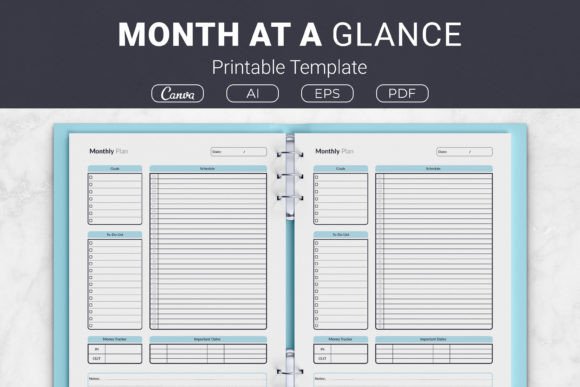
Life moves fast, and without a clear system, important tasks slip through the cracks. A Month at a Glance Printable Template isn't just another piece of paper—it's a compact command center for your entire month. Combining a goals section, to-do list, schedule, important dates, money tracker, and notes on one sheet, this template removes the mental clutter of juggling multiple apps or sticky notes. It’s a favorite among entrepreneurs, busy parents, students, and KDP creators who need a clean, structured, and endlessly reusable overview. If you’ve ever felt overwhelmed before the month even started, having a single page that shows everything at once can transform reactive chaos into proactive calm.
Yet many people end up with templates that fail them—not because the idea is flawed, but because they overlook critical details during selection and setup. Getting the most from these planners means understanding what separates a well-designed monthly overview sheet from a generic grid. Let’s go step by step through the most common missteps and how to avoid them, so you can build a monthly routine that actually sticks.
The Hidden Problem with “Free” or Basic Templates
A quick search offers thousands of free printables, but they often miss the mark in subtle ways. The biggest mistake is grabbing a calendar grid that only shows dates—no goal area, no bill-tracking lane, no space for reflection. When you treat a month at a glance like a simple wall calendar, you lose the integrated planning approach. You end up using separate sticky notes for tasks, another app for finances, and your memory for important deadlines. That fragmented system increases cognitive load and leads to missed bill payments, forgotten goals, or double-booked weekends.
A truly effective Month at a Glance Printable Template goes beyond date boxes. It strategically divides the page so that your financial priorities sit near your monthly schedule, and your top goals stay visible every time you check an appointment. For example, if your template includes a money tracker and an important dates section, you can instantly see that your car insurance is due the same week you planned to put extra money toward savings. Without that visual cue, it’s easy to overspend and then scramble. The correction here is simple: prioritize a template that consolidates life areas, not just one that tracks days.
Rushing into a Template Without Checking Print Compatibility
You find a beautiful design, download it, hit print, and—the edges are cut off, or the margins are so small your hole punch destroys the content. This frustration happens when users ignore the provided sizes, especially if the template is offered in multiple formats like US Letter (8.5 x 11 in), A4 (210 x 297 mm), 7.5 x 9.25 in, or even 6×9 in. Choosing the wrong size for your paper or binder setup can make the planner unusable. Some people resize on the fly, stretching the PDF to fit, which throws off text alignment and wastes ink.
The practical advice is to confirm your paper stock and binder before you select a file. If you’re in the US and use a standard home printer, the Letter size will be your best friend. In Europe or Australia, A4 is the match. For a more compact planner that fits in a personal ring binder or a traveler’s notebook cover, the 6×9 or 7.5×9.25 versions are ideal. The best template bundles—like one that includes Ai Illustrator files, Eps File, and PDF Files ready to print—let you open the source file and adjust margins slightly in Illustrator if needed, without distorting the layout. Always print a test page on scrap paper first to confirm your printer’s actual printable area before committing to a full month.
Overlooking the Power of Dedicated Sections
Even when a template has all the right boxes, people often use them incorrectly. A common mistake is treating the goals section as a grocery list of vague wishes: “exercise more,” “save money.” Without specifics, these become meaningless placeholders. By week two, you ignore the section entirely because it offers no action. Instead, reframe it: the goals block works best when you list one or two measurable outcomes with a deadline tied to a specific date on the calendar. For instance, “Run three times a week until the 26th” connects directly to the schedule row where you block those runs. The to-do list segment should then break down the steps—buy running shoes, find a route, schedule a run with a friend.
Similarly, the notes area is often underused. Don't just leave it blank. Use it for a monthly mantra, a reminder of why you’re working toward a promotion, or even a list of non-negotiable self-care activities. When everything lives on one page, you create a feedback loop: the schedule reflects the goals, the money tracker supports the schedule (you can’t overspend on a night out if it’s not budgeted), and the notes keep your mindset anchored. This integration turns a simple month at a glance printable template into a lightweight life dashboard.
Ignoring Digital Integration: The Canva Template Advantage
Paper lovers sometimes scoff at digital tools, and digital-only users get frustrated when they can’t fill out a printable. A powerful middle ground is a Link Canva Templates option that comes with your purchase. Many people don’t realize they can open the template in Canva, type in their recurring bills, monthly goals, and standard dates, then save that customized version to print fresh each month. It eliminates the repetitive writing of “pay electricity” every single month, while keeping the tactile satisfaction of paper.
The mistake is downloading a read-only PDF and not checking if an editable source is available. With a Canva link, you can change fonts, colors, or even add a small branding element if you’re using it as a client-facing coaching tool. For KDP planner interior creators, this is a game-changer. You can take the source file, modify the design to fit your book’s aesthetic, and then upload it as part of a low-content book. Always verify that the license included with your download allows such use; the provided package with open-source AI files and EPS files typically does, but double-checking prevents copyright headaches.
Choosing the Wrong Size for Your Planning Style
Size affects more than just portability—it changes how you interact with the layout. A 6×9 in template is extremely portable and fits into many pre-made planner covers, but it has limited writing space. If you have large handwriting or prefer to journal a few lines in the notes section, you might find it cramped. Conversely, an 8.5x11 sheet gives you breathing room but feels cumbersome if you plan on the go. Some people buy the bigger size and then scale down when printing, but that often results in tiny, unreadable text.
A better approach is to test two sizes during your first week. Print the A4 and the 7.5 x 9.25 in from the same package and live with each for a few days. Notice where your pen naturally wants to write more. If you find yourself squeezing extra text into the margins of the smaller size, move to the larger one. If the big sheet feels like an empty piece of real estate that makes you procrastinate filling it out, the mid-size or even 6x9 might actually boost your consistency. Don’t lock yourself into one format just because it’s the “standard.”
Not Thinking Ahead About Binding and Storage
A stack of loose monthly sheets turns into a mess fast. Many beginners print a Month at a Glance Printable Template every month and toss it into a drawer, then can’t find the previous month to reference a doctor’s appointment or expense. The missed opportunity is a simple binding system. A standard three-ring binder with clear page protectors or a half-letter discbound system turns those monthly pages into a permanent archive. When tax season comes, your money tracker sheets act as a receipt reference. When you need to recall when you started a fitness routine, the goals section marks the exact month.
The mistake here is punching holes without checking the template’s margin alignment. Good templates include a generous left-side gutter for binding. Before you buy a package, look at the preview images to confirm that no critical information sits within the first half-inch of the left edge on Letter or A4 versions. If you plan to use the 6×9 in format, a small binder or a simple ring clip can house the whole year neatly. Print double-sided on slightly thicker paper (28 lb or 32 lb) to prevent bleed-through and give the sheets a sturdy, premium feel that resists tearing in an active binder.
Treating All “Month at a Glance” Templates as Equal
Just because a template says “month at a glance” doesn’t mean it covers what you need. Some focus heavily on daily schedules with tiny goal sections; others leave out finances altogether. A marketer might need a content calendar and campaign deadline section, while a freelancer needs a clear income and expense block. The package described here—which includes sections for goals, to-do list, schedule, important dates, money tracker, and notes—offers broad coverage, but you should still scan the layout critically. Does the money tracker have enough lines for your variable expenses? Can the important dates area hold birthdays, anniversaries, and project deadlines without spilling over?
Before you commit to using one style for an entire year, assess your real-life categories. For one month, highlight when you miss a section while using the template. You might discover you need a “waiting on” box for online orders or a “habit tracker” row. Because this template package includes source files (Ai Illustrator files and Eps File), you can open the file in Illustrator, Inkscape, or a similar program and add a small row for habits if needed. That flexibility alone saves you from jumping between five different printables.
Practical Advice for a Sustainable Monthly Routine
Block thirty minutes on the last Sunday of the current month to sit down with your new sheet. Fill in the fixed important dates first: bills, appointments, school holidays. Then move to the money tracker—budget your expected income and outline major outflows. With those constraints in place, set realistic goals. Now your schedule and to-do list will reflect what’s actually possible. This sequence prevents the common frustration of setting exciting goals that completely ignore financial or time limitations.
Revisit the sheet daily for just two minutes. Let your morning coffee routine include a glance at the schedule and a check on the to-do list. On Fridays, peek at the money tracker to see if you stayed on course. These micro-check-ins replace the frantic end-of-month scramble. If you’re a KDP planner interior creator, you can even add a “reflection” prompt at the bottom of a customized version to encourage buyers to engage with their planner regularly.
Making an Informed Purchase or Download
When evaluating any Month at a Glance Printable Template, or a bundle that claims to offer multiple sizes and formats, check a few things. Confirm the file types included. Having a PDF Files ready to print is essential for quick use, but access to an editable source like an Ai Illustrator file or a Link Canva Template future-proofs your purchase. If you ever want to change colors, add custom branding, or adjust sections for a different time zone start week, those sources save you hours. Next, verify the size array. Four common sizes mean you’re not stuck if your binder changes later. Finally, ensure the license aligns with your intended use. Personal users can relax, but if you plan to sell KDP interiors, you need explicit commercial permission.
Avoid the trap of buying a template and then immediately looking for another because the first lacked a critical section. Test a single sheet, live with it for a few days, and then invest time customizing the source file to match your rhythm. Your future self, flipping through a binder of completed months, will appreciate the clarity that a well-designed, multi-section monthly overview sheet provided. You’ll see progress in your goals, patterns in your spending, and a record of a life lived intentionally—not overwhelmed by scattered notes.