A Smarter Way to Use a Korean Practice Notebook KDP Interior Without the Usual Publishing Headaches
Getting a Korean practice notebook into the hands of eager learners sounds straightforward. You find a Korean Practice Notebook KDP Interior, upload it to Amazon, and wait for the sales to roll in. The reality, though, has a few more steps and a handful of pitfalls that trip up even experienced self-publishers. Some of those pitfalls involve the technical setup. Others involve overlooking what makes a language practice book genuinely useful for the buyer. When you get both sides right, you create a product that stands out in a steadily growing niche.
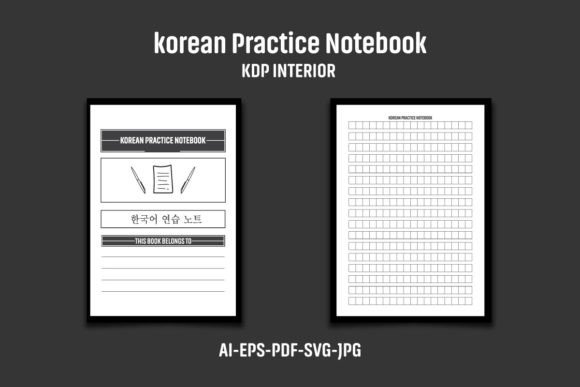
The interior package many creators now rely on includes a complete set of production-ready files. You receive an AI file, an EPS file, a PDF document, two JPG files, and an SVG file inside one compressed ZIP archive. The paperback book interior is sized at 8.5 by 11 inches with bleed, giving you overall dimensions of 8.62 by 11.25 inches. At 120 pages and 300 DPI, the black-and-white layout is clean and purpose-built for language drills. But having the files and using them correctly are two very different things.
Overlooking the Bleed and Trim Can Ruin an Otherwise Clean Interior
One of the most common errors new KDP publishers make is treating the bleed as optional or decorative. It is neither. The bleed exists so that when Amazon trims the physical book, no unprinted white slivers appear along the edges. With this interior, the page design accounts for a finished 8.5 by 11-inch book, while the supplied file extends to 8.62 by 11.25 inches. That extra fraction of an inch around all sides is the safety zone. When someone ignores it, crops into it, or resizes the file without preserving the bleed area, the printed result looks amateurish.
A better approach is to leave the bleed entirely alone. Do not reposition elements closer to the trim edge thinking it looks more balanced on screen. What you see in a PDF viewer does not mimic the physical trim variance that occurs during printing. If a header or page number sits too close to the intended cut line, it may survive on one copy and get sliced off on another. The interior is already structured to keep all critical content inside safe margins. Respecting those boundaries saves you from costly re-uploads and disappointed customers.
Uploading the Interior Without Customization Triggers Duplicate Content Flags
Amazon KDP actively scans for duplicate content across its catalog. When multiple sellers upload the exact same interior file, the platform may flag the listing, suppress it in search results, or even block the book entirely. The note included with many Korean Practice Notebook KDP Interior packages warns about this directly. You need to add your own logo or a unique graphic to the interior pages before uploading.
Some creators skip this step because they assume changing only the cover is enough. It is not. Amazon's systems compare the internal content as well. A sensible fix takes less than an hour. Open the AI or EPS file in Adobe Illustrator and add a small, tasteful logo on the first page, along with a subtle footer variation on practice pages. Even a custom page border, a unique header style, or a branded instruction box can differentiate your version enough to pass review. The goal is not to overhaul the entire interior. It is to signal clearly that your edition is distinct from every other version built from the same source files.
Misunderstanding the ZIP File Delivery and File Extraction
Another friction point happens before any editing even begins. The complete interior is delivered as a single compressed ZIP archive. Some buyers receive the download, see one file, and assume something is missing. Others attempt to open individual files directly from inside the ZIP without extracting them first. Both habits lead to corrupted assets, missing fonts, or linked image errors that do not reveal themselves until the KDP previewer rejects the upload.
Extract the full contents first. On Windows, tools like WinRAR or the built-in extraction work reliably. On Mac, a double-click on the ZIP file expands everything into a folder. Once extracted, you will see all the promised file types: AI for Illustrator, EPS for broad compatibility, the high-resolution PDF, two JPG preview or page files, and the scalable SVG. Keeping the extracted folder organized prevents you from accidentally editing a temporary version while the original sits unused. Treat the extracted folder as your master set, and work from copies.
Ignoring the 300 DPI Standard for Black-and-White Interiors
Some publishers misunderstand resolution requirements and try to reduce the DPI to shrink file size before uploading. With a black-and-white interior at 300 DPI, every character stroke, grid line, and practice cell renders sharply in print. Dropping to 150 DPI introduces softness that makes Hangul characters harder to read, especially for learners who rely on crisp reference lines. The 120-page PDF in this package is already optimized. Resampling it downward does not meaningfully reduce upload time and actively harms the reader experience.
If you need to edit the interior, maintain 300 DPI output settings when exporting your revised PDF from Illustrator or any other design software. Check the export dialog's compression settings and confirm that downsampling is either off or set to retain full resolution for monochrome content. A quick pre-upload check in a PDF viewer at 100 percent zoom will show whether lines remain sharp or degrade into pixelated edges.
Settling for One File Format When Multiple Options Add Flexibility
A package that bundles AI, EPS, PDF, JPG, and SVG formats does more than pad a feature list. Each format serves a different stage of the publishing workflow. The AI and EPS files are editable vectors for those who use Adobe Illustrator or CorelDRAW. The PDF is the upload-ready file for KDP. The JPG files give you quick previews or can be used in promotional mockups. The SVG file offers a lightweight vector alternative for those who prefer open-source tools like Inkscape.
Problems arise when a publisher ignores the vector formats entirely and only works with the JPG files. Raster images lack the scalability and editability needed for clean text modifications. If you want to adjust the grid spacing, change the font used for headers, or add instructional text, the vector files let you do that without quality loss. Relying only on the PDF for editing is also risky if you lack the proper font licenses or software to edit embedded elements. A practical workflow involves opening the AI file, making your branding adjustments, and exporting a fresh PDF for upload, while keeping the original EPS and SVG files as fallbacks.
Skimping on Content Usefulness Despite Having a Ready-Made Interior
A beautifully formatted interior only gets you so far. The people buying a Korean practice notebook expect a functional learning tool, not just a collection of blank grids. Even with a professionally designed Korean Practice Notebook KDP Interior, you should consider the educational value. Are the grids appropriately sized for both beginners and intermediate writers? Does the page layout include stroke order guides or example characters? While the interior provides the structural framework, adding small instructional touches can significantly lift the product's appeal.
Before finalizing your version, print a test page at home. Write on it with a standard pen or pencil. Check whether the line spacing accommodates natural handwriting sizes. If the cells feel cramped, learners will abandon the notebook quickly. If they feel too large, the book may seem juvenile. The 8.5 by 11-inch format with bleed already approximates a comfortable workbook size. Confirming that the writing experience matches learner expectations is time well spent and costs almost nothing.
Neglecting to Verify Overall Dimensions Before the First Proof Order
The listed overall dimensions of 8.62 by 11.25 inches include the bleed area intended for trimming. Some publishers misunderstand this and set their KDP trim size to match those dimensions. That error creates a mismatch between the uploaded interior file and the selected trim size in the KDP setup wizard. The correct trim size for this interior is 8.5 by 11 inches. The larger dimensions are the file's physical extent with bleed included. When you configure your paperback options, enter 8.5 inches for width and 11 inches for height, then let KDP handle the bleed during production.
Getting this wrong often results in a rejected upload or a book that prints with unexpected white borders. If the preview tool shows clipping or misalignment, revisit the trim and bleed settings before placing a proof order. A proof copy, though it adds a small cost, gives you the confidence that the final product matches what you envisioned. Many avoidable returns stem from skipping this physical verification step.
Relying on Stock Mockups Instead of Creating Honest Product Imagery
The product presentation typically includes images and mockups that show how the interior could look when printed and bound. Those mockups are not included in the file package. They exist only to demonstrate the product's potential. Some new publishers grab those presentation images and use them as the book's listing photos. That causes confusion when the final product lacks the pens, desk accessories, or styled backgrounds shown in the mockups. It can also lead to customer complaints about misleading visuals.
A better path is to order a physical proof copy and photograph it yourself. Even a smartphone photo in natural light against a clean desk communicates authenticity far better than a borrowed mockup. Pair that with a screenshot of an actual practice page so buyers see precisely what they will receive. The JPG files included in the package can serve as clean interior previews, but they should be clearly labeled as sample pages, not decorated stock imagery.
Making Long-Term Publishing Harder by Cutting Corners on File Organization
After publishing one notebook, many creators expand into related interiors such as Japanese practice notebooks, Chinese character grids, or multilingual workbooks. If your original source files sit in a disorganized downloads folder under a generic name like final_version_USE_THIS.pdf, future revisions become a guessing game. Naming your extracted folder and edited files with clear descriptors saves you hours of confusion later. Include the interior name, your brand, and a version date in the file name. When Amazon updates its requirements or you decide to refresh the interior design, you will know exactly which files to revisit.
The same logic applies to the AI and EPS files. Document any font names, color values, or custom changes you made inside a simple text file stored alongside the project. Months later, when you cannot recall whether you tweaked the grid stroke weight or not, that note saves you from reverse-engineering your own work.
Approaching a Korean Practice Notebook KDP Interior with attention to bleed, customization, file organization, trim settings, and learner usability turns a generic template into a sellable, unique product. The technical assets are solid. What you layer on top, from simple branding to thoughtful instructional design, ultimately determines whether your listing blends in or earns repeat buyers.