Camping Journal RV Travel Logbook -KDP: Inside the Interior
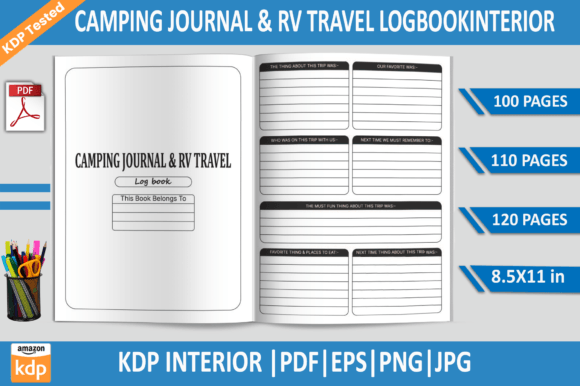
Picture this: you’ve been thinking about creating a low-content paperback for the outdoor and RV community, but the thought of designing 110 pages from scratch stops you cold. That’s where a ready-made interior like the Camping Journal RV Travel Logbook -KDP changes the game. It’s not just a file download; it’s a shortcut that lets you focus on branding and selling while someone else has already solved the layout, spacing, and bleed headaches. Whether you’re a seasoned KDP publisher or testing the waters with your first title, this interior pack removes the friction between having an idea and holding a proof copy in your hands.
What You Actually Get in the Download
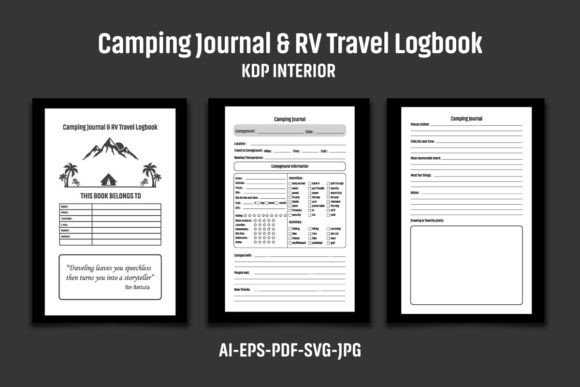
When you unzip the package, you’re not just getting a single PDF and hoping it works. The Camping Journal RV Travel Logbook -KDP bundle includes multiple file formats so you can tweak, recolor, or repurpose the design in almost any software you already own. Here’s the typical breakdown:
- 1 AI File – Native Adobe Illustrator file for deep customization. Works with CS6 and newer.
- 1 EPS File – Vector format that imports cleanly into Affinity Designer, CorelDRAW, or older Illustrator versions.
- 1 PDF File – Print-ready, 110-page interior at 6.12 x 9.25 inches (with bleed). Use it as-is or drop it right into KDP.
- 1 SVG File – Open standard vector for web-based editors like Inkscape or Canva (with some limitations).
- 3 JPG Files – High-res 300 DPI previews or elements you can place in other designs.
All files sit inside a single ZIP archive. If you’re on Windows, right-click and “Extract All” or use WinZip / WinRAR. Mac users can double-click. The folder structure is minimal, so you won’t waste time hunting for assets. What you won’t find inside are the mockups, cover images, or promotional text—those are presentation-only. The actual product is the interior pages, delivered clean and unbranded, waiting for your touch.
Why a Dedicated RV Logbook Interior Beats Starting from a Blank Page
Many first-time publishers underestimate the amount of tweaking a “simple” journal needs. KDP’s trim size requirements, mirror margins, and bleed settings can trip up even experienced designers. The Camping Journal RV Travel Logbook -KDP interior arrives at exactly 6.12 x 9.25 inches—perfect for a 6x9-inch paperback with bleed. That means the edge-to-edge design elements won’t get clipped during printing. Every one of the 110 pages uses black-and-white high-resolution graphics at 300 DPI, so you get crisp lines without worrying about color mode conversions.
Because the interior is vector-based in the AI and EPS files, you can change every line color, remove elements, or add new camping icons without losing quality. Want to shift from a purely RV-focused log to a broader camping journal? You can edit the headers and page prompts. The editable source files turn a static template into a springboard for multiple niche variations—think glamping journals, boondocking logs, or national park trip diaries—all from one purchase.
Who Finds This Interior Especially Useful
The audience for this kind of ready-to-publish asset is broader than you might expect. It extends well beyond just KDP sellers.
Freelance designers and layout artists often grab interiors like this to fulfill client requests without reinventing the wheel. A client says, “I want a branded RV trip log in two weeks.” Instead of building a 110-page grid from scratch, you open the AI file, drop in the client’s logo, adjust a few typefaces, and deliver a proof the next day. The time savings translates directly into higher profit margin on the project.
Travel bloggers and content creators are another natural fit. Perhaps you run a YouTube channel about RV living. Offering a companion paperback logbook deepens audience engagement and adds a passive income stream. With the Camping Journal RV Travel Logbook -KDP interior, you don’t need to hire a designer. Just add your channel name and a custom cover, and you’ve got a merch line that fits Amazon’s ecosystem.
Educators and workshop facilitators teaching outdoor skills or RV maintenance can adapt the interior into a class workbook. Because the PDF is editable in Adobe Acrobat (basic text additions) and the vector files can be completely reworked, you can create fill-in-the-blank sections, trip planning checklists, or maintenance logs. The 110-page count gives you room to mix and match page types.
Print-on-demand entrepreneurs building a portfolio around camping, hiking, and outdoor journals will find this interior slots right into their product line. The black-and-white design keeps printing costs low, and the consistent layout across all 110 pages makes the book feel cohesive—even if you only glance inside for a second.
Practical Examples That Show the Interior in Action
Consider a small branding studio that partners with RV dealerships. The dealership wants to give away a custom travel log with every new trailer purchase. Using the Camping Journal RV Travel Logbook -KDP interior, the studio extracts the AI file, replaces the generic header with the dealership’s logo, and changes the accent color to match the brand palette. In under an hour, the interior is ready to upload. The studio charges a premium for the custom version, having invested only in the base template and a bit of time.
Or imagine a solo entrepreneur who noticed a gap: there are plenty of camping journals on Amazon, but few specifically track fuel stops, campground amenities, and RV maintenance intervals. She downloads this interior, opens the EPS file in Affinity Designer, and duplicates a few pages to add new sections. She tweaks the page numbering, exports a fresh PDF, and publishes a niche logbook that fills that exact need. The process from download to hitting “Publish” on KDP takes a single weekend.
Even a hobbyist running an Etsy store selling printable products can use the JPG or PDF pages to create a digital camping planner. They extract individual trip-log pages, bundle them as a printable PDF, and sell it as a low-cost digital download. The 300 DPI resolution ensures sharp printing on home printers. Because they’re not re-selling the interior as-is on Amazon, they stay compliant with the usage terms.
Customization Without the Overwhelm
One of the standout qualities of this interior package is the “easy to color change” note. In the AI and EPS files, the artwork uses a limited palette that you can alter globally. Select the main header text, swap black for a dark forest green, and the whole book updates. You can do the same in Illustrator’s “Recolor Artwork” panel or by editing swatches. If you’re not comfortable with vectors, the black-and-white PDF is plug-and-play: upload it, order a proof, and see if you like the in-hand feel before investing in custom edits.
However, keep in mind the repeated instruction: “You need to create your own interiors to upload on Amazon KDP. Please add your logo or graphic to the Interior page before uploading to KDP to prevent any flags for duplicate content.” Amazon checks for duplicate interiors, and a widely sold template can trigger flags if you don’t add noticeable changes. A subtle logo on the page footer or a unique border element is often enough. The vector files make this trivial. Even if you only have the PDF, tools like Canva Pro or Adobe Acrobat let you layer an image on top of each page before export. This step signals to KDP’s review system that the interior is not identical to any other title.
File Handling Tips for a Smooth Workflow
ZIP files intimidate some people, but handling this bundle is straightforward. After downloading, extract the ZIP. You’ll see a folder with the six files. If you’re using an older version of Illustrator, open the EPS (saved in CS6 version) to avoid compatibility snags. The PDF is already perfectly sized, so if you plan no edits, open it, do a quick spot-check for page alignment, and save it directly through KDP’s paperback uploader. Remember that Kindle Direct Publishing expects a PDF with pages in order, including a blank page if needed, and all margins respected. This interior already accounts for that, including mirror margins for left and right pages.
If you plan to edit extensively, work from the AI file. Create a copy first so you always have a clean master. Use layers to your advantage: lock the background template layer, then add your new elements on top. Doing this preserves the original structure and simplifies troubleshooting if the file later behaves unexpectedly. The 300 DPI setting means when you export to PDF, the images will remain sharp, but make sure you don’t accidentally downsample during export—check your output settings.
Maximizing Value Across Multiple Platforms
The Camping Journal RV Travel Logbook -KDP interior isn’t locked to Amazon alone. Because you get the original vector files, you can repurpose the design for hardcover editions on IngramSpark, spiral-bound notebooks on Lulu, or even as a printable iPad planner on Gumroad. The 6.12 x 9.25-inch dimension (with bleed) works for many POD platforms that accept standard trim sizes. Just confirm the bleed requirements for each service. If you go the digital route, the JPGs or extracted PDF pages serve as standalone planner inserts—perfect for selling on Etsy under the “printables” category.
From a branding perspective, these pages give you a consistent visual language. If you publish multiple logbooks (mileage tracker, meal planner, campsite review journal), using the same underlying layout creates a family of products that customers recognize. You can change cover designs and a few interior pages to target distinct niches while keeping the backbone the same. This approach dramatically cuts production time and builds a catalog faster than most competitors can manage.
Things to Keep in Mind Before You Upload
While the interior handles most of the heavy lifting, a few practical considerations can save you from rejections or disappointed buyers. First, always generate your own cover. The interior files do not include a cover design. Use KDP’s cover template generator with the 6x9-inch trim and your final page count to calculate spine width. Many first-timers forget that adding custom pages (like a personalized introduction) changes the page count and therefore the spine width. If you edit the interior to add pages, recalculate your cover dimensions.
Second, test the interior in black and white. The files are already black and white, but if you introduce color—even a dark navy—it will print as shades of gray on Amazon’s black-and-white presses. Avoid light pastels; they may disappear entirely. Stick to high-contrast edits. If you want a color interior, you’d need to upgrade to KDP’s color printing and higher price point, which also requires a different file setup.
Third, remember the “no duplicate content” flag. Amazon’s bots compare interiors against a vast database. Even if you change the logo, consider altering a few page layouts or adding a unique “Welcome” page with your copyright and social handles. The vector source files give you the freedom to do that easily. A few original touches also make your listing stand out to customers who browse the “Look Inside” feature.
Finally, order a physical proof. No screen can replicate how a paperback feels in the hand, how the binding works, or whether margins feel too tight. A proof costs less than a dinner out and can prevent a cascade of negative reviews about formatting. Many successful KDP publishers build a single proof into the production budget for every new title.
Why This Interior Makes Sense for Your Publishing Toolkit
If you’ve ever spent hours aligning page numbers only to find them off-center in the printed version, you’ll appreciate the behind-the-scenes precision of this Camping Journal RV Travel Logbook -KDP interior. It acts as a shortcut, a learning tool, and a professional foundation all at once. New publishers see how a polished interior is structured; seasoned designers save billable time. The wide array of file formats means you never feel forced into a single workflow. And the generous 110-page count gives your book enough substance to feel real and useful, not thin and rushed.
In a market where outdoor enthusiasts are constantly searching for organized ways to document their adventures, a well-made logbook can earn steady, passive royalties. By starting with a proven interior layout and adding your unique twist—whether that’s a regional focus, a clever theme, or simply your logo—you put yourself in a position to capture that demand without starting from zero. The most successful low-content publishers blend ready-made assets with their own creative judgement. This interior gives you that blend, without the grunt work of building every line and margin from scratch.