Getting the Most from a Gas Mileage Logbook Interior Design
Keeping a fuel log might sound old-fashioned in the age of apps and digital dashboards, but a well-crafted paper record still beats screen-only options for many drivers, fleet managers, and small business owners. The key is having an interior that actually supports the habit instead of fighting it. That’s where a thoughtful Gas Mileage Logbook Interior Design comes in. It isn’t just about pretty spacing—the layout, field choices, and page flow directly affect whether you’ll stick with logging or give up after two entries.
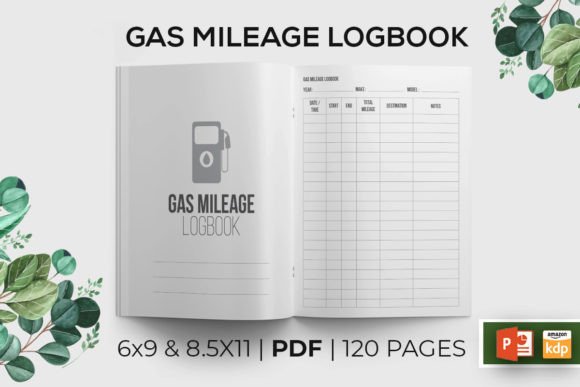
When you spot a Gas Mileage Logbook – KDP Interior Design available as a ready-to-upload PDF, you’re looking at a shortcut that skips hours of formatting. But a shortcut is only helpful if it leads somewhere useful. Too many creators and buyers grab interiors that look fine on screen but fail on real paper or on the Amazon KDP platform. Understanding what makes a logbook interior genuinely functional helps you avoid buying a template that creates more work than it saves.
Why the Interior Layout Matters More Than the Cover
Most people fixate on a cover design and treat the inside pages as an afterthought. That’s the first big mistake. A gas mileage logbook lives or dies by its interior usability. If your date column is too narrow, odometer readings bleed into notes, or the math logic doesn’t match how people actually calculate fuel economy, the book collects dust in the glovebox. A strong interior design anticipates these real-world frictions.
Common oversights include cramming too many fields onto a single line, using font sizes that require a magnifying glass, or forgetting that left-handed writers need a comfortable margin near the binding. These aren’t hypothetical nitpicks—I’ve seen logbooks that placed the “Total Gallons” field so close to the spine that writing became an exercise in hand gymnastics. The result? Inconsistent entries, scribbled numbers, and a record that’s useless during tax prep or vehicle sale negotiations.
A practical interior design gives every entry breathing room. It groups related information logically: trip date, starting odometer, ending odometer, miles traveled, gallons purchased, price per gallon, and total cost. Some advanced layouts include a calculated MPG column, but be cautious—forcing users to do math in a small box often leads to errors. Instead, a row that reminds you to record raw numbers and leave the calculation for later review tends to be more accurate.
Common Mistakes People Make When Selecting a Gas Mileage Logbook Interior
Let’s get specific about the errors that trip up both creators uploading to KDP and people buying the finished notebooks. These aren’t always obvious, which is why they keep reappearing in otherwise decent products.
Ignoring the No-Bleed Requirement for KDP Interiors
This one surprises newcomers. A bleed setting on a KDP interior means extra trim area that often isn’t needed for a simple lined or tabled notebook. Many logbook interiors are designed without bleed—and that’s intentional. When you see a note like “Note Interior is without BLEED,” it’s a feature, not a flaw. Uploading a no-bleed interior as a bleed document creates unwanted white margins or triggers formatting errors during Amazon’s review. If you’re downloading a Gas Mileage Logbook KDP Interior, verify that it matches your KDP trim and bleed settings before uploading. A mismatch can lead to customer returns because the layout looks off-center or cramped.
Choosing the Wrong Trim Size Without Testing
Offering both 6×9 and 8.5×11 inches is smart, but only if the interior flexes correctly. I’ve seen interiors designed for 6×9 that someone just stretches to fit letter size, distorting the table proportions. The same page count behaves differently at each size. A 120-page logbook at 6×9 feels substantial and portable; at 8.5×11 it becomes a thicker workbook that might not slide easily into a glove compartment. Think about how the user will store and handle the book. If your target reader is a trucker logging daily stops, compact durability matters. For someone managing a fleet from a desk, the larger format with bigger writing spaces might be the better fit.
Skipping the Intro Page or Using It Ineffectively
Many people treat the intro page as filler—just a “This log belongs to:” line and maybe a date. But a well-designed intro does more. It can include a quick reference guide on how to fill each field correctly, a conversion chart for liters to gallons, or a maintenance reminder checklist linked to mileage intervals. This small addition transforms the interior from a passive ledger into a proactive tool. The best KDP-ready interiors I’ve seen use the intro page to set the user’s expectations and reduce the learning curve. When you download a template that includes an intro page, check whether it’s genuinely helpful or just taking up space.
Overloading Pages with Unnecessary Columns
Enthusiasm for thoroughness leads to grids that look like a spreadsheet exploded. You’ll find columns for weather conditions, driving style, tire pressure, octane rating, and even the gas station brand. While that data has value for serious hypermilers, the average driver trying to track business miles or monitor fuel efficiency just wants the essentials. Cluttered pages increase the chance of skipped entries. Strip it back. If you’re buying or creating a logbook interior, start with the core seven to eight fields and test whether users can fill a row in under thirty seconds. If the task feels like paperwork, adherence drops dramatically.
Disregarding Font and Line Weight for Legibility
Thin, trendy fonts look sleek on a digital mockup but wash out when printed by KDP’s ink or toner process. Similarly, light grey grid lines that seem elegant on screen can become nearly invisible on cream paper. Always test print a few pages at home before committing to upload. You’re designing for a reader who might be jotting numbers in dim garage light or at a sun-drenched pump. High-contrast, slightly heavier lines and a readable sans-serif or clear slab serif font at 10–11 points will serve far more people than a delicate 8-point typeface. Accessibility here isn’t a compromise—it’s what makes the product usable.
How These Mistakes Affect the Finished Product
Each of these missteps creates friction that compounds over the life of the logbook. A slightly misaligned table means entries drift across days, making month-end calculations a headache. A missing intro page leaves users guessing whether “Miles” means trip miles or odometer reading. And a bleed mismatch can trigger an outright rejection from KDP’s quality check, costing you days of back-and-forth. For the buyer, the result is a logbook that feels amateurish and gets abandoned, confirming the bias that paper logs are outdated. That’s a missed opportunity because a well-executed interior can actually outperform apps in clarity and focus.
Practical Ways to Avoid These Interior Design Pitfalls
The good news is that most problems are solvable before you ever hit the upload button or click “Buy.” Here are better approaches that save time and reputation.
Test with Real-World Scenarios
Print five pages of your interior at the intended trim size. Take them to your car. Actually fill them out using a pen you’d keep in the center console. Does the clip of the pen hit the binding? Can you write the odometer without lifting your wrist at an awkward angle? Do the numbers align visually so you can scan across rows? This hands-on check reveals problems no screen preview can. Adjust margins, column widths, and row heights accordingly. A 120-page logbook interior should leave a margin of at least 0.75 inches on the inner side for comfortable writing, especially in 6×9 format.
Leverage KDP’s Print Preview Rigorously
Amazon’s online previewer is not optional—it’s your front line of defense. Load your PDF and flip through every page, not just the first couple. Look for shifts in alignment, element cutoff, and text clarity. If your interior is without bleed, confirm that no content sits right at the edge where a slight trimming variance could chop off letters. Also check that page numbers or headers don’t crowd the binding gutter. A KDP-tested file like the one described saves you this entire step, but if you’re customizing, never skip the preview.
Offer Both Sizes with Intentional Scaling
Having both 6×9 and 8.5×11 interiors isn’t just a checkbox; it’s two different products. The larger size needs adjusted font sizes, potentially wider columns, and possibly extra rows per page to avoid a wasteful amount of white space. The smaller size might benefit from fewer columns to keep the layout open. When you download a bundle that includes both, check if the designer truly optimized each variant or just pasted the same layout onto a larger canvas. Quality interiors will show adjusted proportions that suit the reading and writing experience of each size.
Use the Intro Page as a Value Multiplier
Instead of a blank “Name” line, include a QR code that links to a video tutorial on mileage tracking for taxes. Or add a formula reminder: MPG = (Ending Odometer – Starting Odometer) / Gallons. A small section explaining the difference between business and personal miles for deductions turns a simple logbook into a financial tool. Even a few practical tips on the intro page dramatically increase perceived value and user satisfaction.
What to Check Before You Decide on a Gas Mileage Logbook Interior
Whether you’re downloading a ready-made KDP interior or planning to purchase a physical logbook, a short checklist prevents disappointment. First, confirm the bleed setting: many interiors are intentionally no-bleed, so ensure your KDP project matches. Second, validate the trim size and page count. 120 pages is common because it provides ample recording space for a year of frequent driving without becoming too bulky. Third, examine the file type. A single ready-to-upload PDF with embedded fonts and correct margins saves hours. Fourth, look for KDP testing confirmation. If a seller notes that the files were tested on Amazon KDP, that’s a strong signal of reliability—though you should still run your own preview.
Also, consider the logical flow of data. The sequence should mirror the natural order of events at the pump: you note the odometer, you fill up, you record the gallons and cost. Placing cost before gallons is a minor irritant that makes the process feel unnatural. The best interiors follow the driver’s actual routine.
Finally, think about the end user. A rideshare driver needs quick entries with minimal fuss; a classic car enthusiast might want space for notes about driving conditions and oil changes. The interior design should flex toward the primary audience. If you’re creating the product, researching a specific niche and adapting the interior accordingly often outsells a generic “one size fits all” approach.
Why a Well-Designed Interior Rewards Both Seller and Buyer
For KDP publishers, a logbook interior that accounts for these details earns better reviews and fewer returns. Buyers notice when a product feels effortless. They’ll recommend it on forums and buy multiple copies for their family’s vehicles. For drivers, a thoughtful layout turns a chore into a quick, almost satisfying routine. The data collected stays legible, making it useful for budgeting, maintenance tracking, or proving business mileage to the IRS.
Technical terms aside, the core idea is simple: design the interior like you’ll be the one holding a pen in the driver’s seat. That empathy prevents nearly every mistake outlined here. When you find a Gas Mileage Logbook Interior Design that feels engineered rather than thrown together, you’re looking at a resource that actually changes behavior—and that’s worth far more than a polished cover.