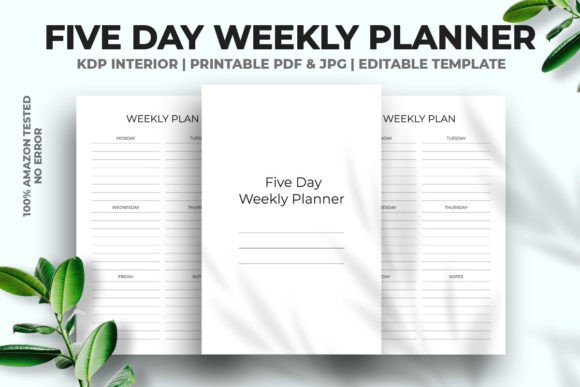
Five Day Weekly Planner KDP Interior
A clean, well‑structured planner interior does more than hold to‑do lists — it sets the rhythm of someone’s week. The Five Day Weekly Planner KDP Interior gives publishers and designers a production‑ready foundation that feels polished from the first glance, without demanding hours of layout work. As a vector‑editable PDF, it’s built to slide straight into your publishing workflow while still letting you make meaningful changes if the project calls for a different color palette, logo placement, or branding layer.
A Purposefully Restrained Layout That Works for Everyday Planning
Weeklies often try to pack in too much, leaving users overwhelmed. This interior takes the opposite approach: it offers a five‑day grid with just enough breathing room. At 6 × 9 inches, it mirrors the proportions of a well‑loved paperback and sits nicely on a desk or slips into a bag. The no‑bleed setup means you won’t lose important lines into the gutter, which is a detail end users notice when handwriting crosses the binding — or doesn’t.
Visually, the design stays out of the way. Lines are crisp, the hierarchy between day headers and note space is intuitive, and there’s no decorative clutter competing for attention. The result feels at home in a minimalist notebook, a professional daily diary, or even a guided journal where someone builds their own habit tracking on top of the structure. That neutrality is part of its strength: it gives you, the publisher, room to wrap it in a cover that can be playful, corporate, artsy, or anything in between.
From Low‑Content Publishing to Full Brand Extensions
The most obvious home for this interior is Amazon KDP’s low‑content book space. Because it’s already been tested on the platform with no upload errors, you can literally take the print‑ready PDF, pair it with your cover, and have a product live in minimal time. That speed matters when you’re building a catalog — one planner becomes a series by swapping covers or tweaking page counts, and you’re suddenly serving multiple niches without redesigning from scratch.
Designers also find it valuable as a base for client work. A small business wanting branded weekly diaries for retail or corporate gifting can have the vector file recolored, re‑sized, and adapted in Adobe Illustrator without losing quality. The 300 DPI high‑resolution JPGs are handy for mockups, Etsy listings, or promotional social graphics. Even content creators who sell printable planners directly to their audience can use the editable PDF to add personal contact details, QR codes, or community prompts before exporting finished copies.
How the Design Reinforces Readability and Engagement
Good planning tools work on two levels: they make information easy to scan, and they encourage consistent use. In this five‑day layout, the week sits on a single spread or consecutive pages — Monday through Friday — so the eye doesn’t jump around. The absence of bleed and the clean alignment of text areas creates a visual order that reduces cognitive friction. When someone opens their planner, they immediately see the daily slots, not a chaotic design.
For creators thinking about brand perception, that kind of clarity sends a quiet message. It says the person behind the product values functionality over flash, that they understand how real people use a planner. A hurried, misaligned interior makes a brand feel amateur; a precise, repeatable layout builds trust. And when readers trust the tool, they’re more likely to come back for the companion journal, the undated edition, or the larger format version you launch next quarter.
Consistency Across a Publishing Line
One interior can anchor multiple products. By keeping the weekly structure constant and varying only the cover designs or introductory pages, you create a recognizable product family. This works especially well if you publish under a single brand name — customers start to associate that specific grid layout with your quality. The vector nature of the file makes it simple to pull the core week view into a 120‑page notebook this month, then into a 90‑page compact version later, all while preserving line spacing and overall feel.
Practical Notes on Customization and Upload Readiness
Every KDP publisher has felt the sting of a rejected file. Slight margins off, bleed mismatches, or resolution warnings can stall a launch. Because this interior is delivered as a no‑bleed, ready‑to‑upload PDF at exactly 6 × 9 inches, you’re working with a preset that already passes Amazon’s automated checks. When the time saved avoiding back‑and‑forth is applied to marketing, cover design, or simply launching more titles, the value becomes very tangible.
If you do need to modify anything — say, you want to add page numbers, change the font weight of the day headers, or layer faint dot grids into the planning area — Adobe Illustrator opens the vector PDF without flattening. That means you can ungroup elements, adjust line colors, or scale the whole thing to a different trim size while preserving crisp edges. Just remember that if you switch to a bleed‑inclusive 6 × 9 inch format, you’ll want to manually extend any background elements; but for the standard no‑bleed approach, the file is genuinely plug‑and‑play.
- File type: Vector editable PDF (compatible with Adobe Illustrator)
- Trim size: 6 × 9 inches — ideal for portable planners
- Page count: 120 pages — enough depth without bulk
- Bleed: None — safe margins throughout
- Resolution: High‑resolution JPG at 300 DPI for crisp printing
- Upload status: 100% tested on Amazon KDP, no errors
Why a Tested, Error‑Free Interior Changes Your Workflow
Many designers can build a planner layout. Few have run that layout through KDP’s ingestion pipeline multiple times to weed out hidden issues — things like text too close to the trim, color profiles that cause unexpected ink limits, or elements that shift during flattening. When you’re growing a low‑content publishing business, each error costs time and delays income. A pre‑tested interior sidesteps that entire loop. You focus on building the product, not troubleshooting the file.
It also lowers the barrier for people who aren’t deep in design tools. If your strength lies in identifying underserved planner niches — maybe a five‑day wellness tracker for nurses, a minimalist weekly for freelancers, or an academic term companion — you don’t need to master typography or pagination. You take the ready PDF, place your cover, and publish. Over time, as you get a feel for what your buyers respond to, the editable PDF lets you inch into light customization without starting from zero.
Making the Most of the Multi‑Format Files
Beyond KDP, the high‑resolution JPGs included open up promotional uses that often get overlooked. A quick social media post showing an interior page becomes far more convincing when the image is sharp and properly composed. You can use a JPG to create a preview PDF for your author website, build a Pinned image for Etsy or Pinterest, or print physical samples for craft fairs without re‑exporting anything. The vector PDF stays your master file; the JPGs become your visual sales team.
Designing Around the Planner’s Personality
Calling a planner interior “simple” sometimes sounds like a backhanded compliment, but simplicity in a weekly grid is a designed characteristic, not an absence of effort. The spacing between rows, the proportion of the header bar, the thickness of lines — all of those were intentionally set. When you pair this interior with a bold typographic cover, the contrast feels deliberate. When you wrap it in a soft, hand‑illustrated cover, the inside feels calm and dependable. That chameleon quality means a single interior can support a surprisingly wide product range without looking mismatched.
How to Approach Your First Project With This Interior
Start by defining the user you want to serve. A five‑day layout naturally fits a workweek rhythm, so think about who would benefit most: small business owners planning their Monday‑Friday tasks, teachers tracking weekly lessons, parents organizing family activities while saving weekends for flexibility. The structure already nudges the user toward weekday focus, which you can accentuate with a cover and title that speak directly to that need.
After the niche is clear, resist the urge to overcomplicate the inside. While the vector file lets you add extra sections, test whether those additions genuinely improve the user experience. A clean, uninterrupted five‑day view often outperforms a busy hybrid planner — and it keeps your production process swift. If you do add elements, consider small branded touches: a subtle logo at the bottom of each page, a motivational line or website URL in the footer, or a faint check‑in box per day. Through the editable PDF, those customizations stay sharp and professional.
Supporting a Growing Low‑Content Publishing Brand
The team behind this interior has spent over a decade in high‑end branding and product development across print and digital media. That experience shows up in the little things: the line weights chosen for long print runs, the safety margins that work across Amazon’s manufacturing tolerances, and the file format that doesn’t handcuff you when your business evolves from a single title to a full product line. Creators who tap into that kind of professional foundation often find they spend far less time on the technical side and far more time spotting the next niche, designing eye‑catching covers, and connecting with repeat buyers.
A well‑built planner interior quietly does its job, month after month, while the cover and brand story drive the shelf appeal. But when customers write reviews praising how easy the pages are to fill out, how the week doesn’t feel cramped, and how they bought a second one for a friend — that’s when you know the interior carried its weight. The Five Day Weekly Planner KDP Interior is built to be that kind of behind‑the‑scenes workhorse, ready to support whatever creative direction you take next.