How a Task Priority Checklist Transforms Chaotic Workflows into Clear Daily Blueprints
Most people begin their day with a vague sense of what needs to happen. Emails pile up, requests fly in from different directions, and by noon the original plan has dissolved into reactive firefighting. The difference between those who consistently move forward and those who merely stay busy often comes down to a single habit: writing things down with intention. A Task Priority Checklist is not simply a to-do list. It is a structured thinking tool that forces clarity before action begins.
When you place a blank sheet in front of yourself and commit to filling it thoughtfully, something shifts in how your brain processes the hours ahead. The printable format—whether on US Letter at 8.5 x 11 inches, A4 at 210 x 297 mm, or compact versions like 7.5 x 9.25 inches and 6×9 inches—gives physical presence to what would otherwise remain abstract mental noise. There is a reason paper-based systems persist in an age of digital tools. Writing by hand engages different cognitive pathways, slowing down the planning process enough to surface real priorities rather than reactive impulses.
Why Simple Lists Fail and Structured Checklists Succeed
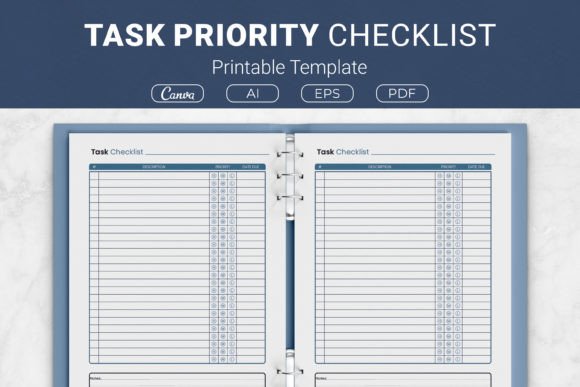
A standard list of ten items offers no guidance. Everything looks equally important. Tasks of vastly different magnitudes sit side by side, and the natural human tendency is to tackle the quick, easy wins first. This feels productive but often leaves the highest-impact work untouched. A Task Priority Checklist solves this by separating the act of capturing tasks from the act of evaluating them. Spaces for priority levels, due dates, and notes create a miniature decision framework on a single page.
Consider a freelance graphic designer juggling three client projects, administrative paperwork, and a professional development course. Without a structured approach, the loudest client email wins. With a priority checklist, the designer can mark urgent client revisions as high priority, schedule the paperwork for a specific due date, and note that the course requires two uninterrupted hours later in the week. The notes section captures context that would otherwise be forgotten—a client's specific feedback, a file location, or a reminder to invoice immediately upon delivery.
Breaking Down the Anatomy of an Effective Priority Template
The best templates balance structure with flexibility. Too many fields become overwhelming and go unused. Too few, and the tool provides no advantage over a blank notebook page. The design included in packages containing AI Illustrator open source files, EPS files, and ready-to-print PDFs typically offers the sweet spot: task description columns paired with priority indicators, deadline fields, and a dedicated notes area.
Having access to the source files matters more than casual users might realize. An Adobe Illustrator open source file allows complete customization—changing fonts, adjusting column widths, adding branding, or modifying the layout to fit highly specific workflows. The EPS file provides compatibility across different design software environments. Meanwhile, the PDF version is ready to print immediately, and Canva template links open the door for those who prefer browser-based editing without installing specialized software. This range of formats acknowledges that users exist on a spectrum from fully analog to hybrid digital-physical systems.
Physical Sizes Shape Different Behaviors
Page dimensions are not arbitrary. The standard US Letter and A4 options suit desktop use and three-ring binders, making them natural choices for office environments and comprehensive planning systems. The smaller formats—7.5 x 9.25 inches and 6×9 inches—fit into bags, purses, and smaller notebooks. This portability changes when and where planning happens. A compact checklist pulled out during a commute or between meetings captures thoughts at the moment they arise, reducing the cognitive load of trying to remember everything until returning to a desk.
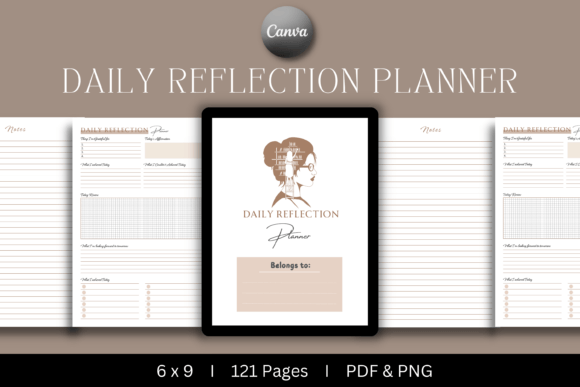
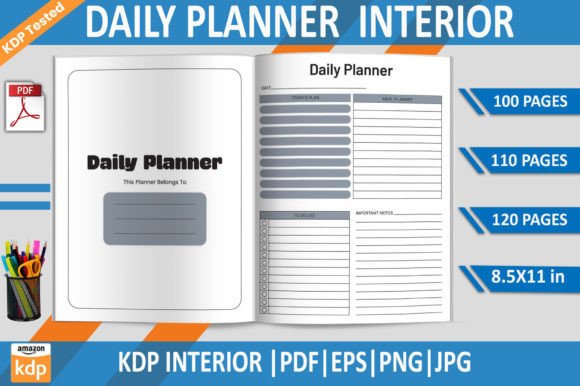
For creators publishing on platforms like Kindle Direct Publishing, these template sizes align with KDP interior formatting requirements. A thoughtfully designed planner interior can become a product in its own right. The open-source Illustrator files make it possible to adapt the design to specific niches—a task checklist for writers, for parents managing household responsibilities, for students tracking assignments, or for small business owners balancing operations with growth activities. The versatility extends far beyond personal use.
Practical Strategies for Using Priority Levels Effectively
Most people misuse priority systems by marking everything as high importance. True prioritization requires honest assessment of consequences. A useful practice involves asking: what happens if this task does not get done today? If the answer is genuinely catastrophic—a missed legal deadline, a lost client, a health risk—the priority is clear. If the answer is mild inconvenience or someone else's unnecessary urgency, the task deserves a lower ranking.
Some users adopt a simple three-tier system: must do today, should do soon, and nice to do eventually. Others prefer the Eisenhower matrix approach, evaluating urgency and importance separately. Either method works, but consistency matters more than the specific framework. Using the same Task Priority Checklist daily trains the brain to evaluate incoming demands through a consistent lens, gradually improving the quality of judgments.
Integrating Due Dates Without Creating Overwhelm
A field for due dates seems straightforward, but its value multiplies when used strategically. Rather than only recording external deadlines, thoughtful users add self-imposed dates for larger projects broken into phases. A product launch six weeks away becomes manageable when the checklist shows a draft due next Tuesday, design assets due the following week, and final review scheduled a few days before the launch date. The notes section holds the details that turn these checkpoints from arbitrary markers into meaningful milestones.
For KDP publishers and creators developing planner products, this date field is particularly important. Customers buying printable planners expect functional layouts that genuinely help them manage time. A design that leaves adequate writing space while keeping the overall page clean and uncluttered performs better in reviews and repeat purchases. The balance tested across the included size variants—from full letter sheets to compact 6×9 layouts—ensures the design adapts gracefully without losing functionality at smaller scales.
The Notes Section as a Silent Productivity Partner
Often the smallest section receives the least attention in template design, yet notes carry disproportionate value. A task named “prepare presentation” is vague. A note reading “focus on Q3 metrics, include competitor comparison, send draft to Sarah by Thursday” transforms the task into something immediately actionable. The notes field captures the specifics that would otherwise require additional emails, searches, or mental backtracking to reconstruct.
Users who print these checklists at home and organize them in binders often develop a personal shorthand. One glance at a note from last Tuesday recalls the exact context of a delayed task, eliminating the need to mentally retrace steps. Over weeks and months, filled checklists become a record of completed work—useful for performance reviews, client billing, or simply maintaining perspective on progress during periods that feel stagnant.
Adapting the System for Different Professional Contexts
A Task Priority Checklist serves distinct purposes depending on who holds the pen. For business owners, it bridges the gap between high-level goals and daily operations. Monday's checklist might include strategic tasks like reviewing partnership agreements alongside operational items like approving payroll. The priority markings prevent the urgent operational work from completely consuming the time needed for longer-term thinking.
Educators and researchers use these templates differently. Grading deadlines, lecture preparation, committee meetings, and personal research goals compete for attention. A checklist with clear priority columns helps ensure that research—often the most important but least urgent activity—receives scheduled time rather than perpetual postponement. The notes field captures references, page numbers, and ideas that surface during busy teaching days but are relevant to weekend writing sessions.
Hobbyists and home users benefit equally. Planning a garden involves seed orders by certain dates, soil preparation timelines, and ongoing maintenance tasks spread across seasons. A home renovation tracked through checklists keeps subcontractor schedules, material orders, and inspection dates visible in one place. Even event planning—holidays, birthdays, family gatherings—becomes less stressful when broken into component tasks with realistic priorities and deadlines.
Hybrid Workflows Combining Paper and Digital Tools
Printing a checklist does not mean abandoning digital systems. Many effective workflows use paper for daily planning and digital tools for long-term storage and collaboration. Morning planning happens on the printed template, capturing priorities for the day ahead. Completed tasks and notes that need to be shared get transferred to project management software or team communication platforms. Paper handles the thinking; digital handles the distribution.
For those using Canva templates, the hybrid possibilities expand further. Edits made online can incorporate digital elements before printing—color coding, custom headers, or branding elements that would be tedious to add by hand. The printed result combines the flexibility of digital design with the cognitive benefits of physical writing. PDF versions stored on tablets with stylus support offer another hybrid path, allowing handwritten task management without paper consumption.
Creating Consistency Through Accessible Design
The most beautifully designed template fails if it sits unused in a drawer. Accessibility in this context means the checklist is always within reach, quick to fill out, and satisfying to use. Home printing on US Letter or A4 paper keeps costs negligible and ensures supply never runs out unexpectedly. Keeping printed sheets in a dedicated binder builds a visible record of commitment, which reinforces the planning habit over time.
The availability of multiple file formats lowers barriers for different user types. Someone comfortable with Adobe Illustrator can deeply customize every aspect. Another person who never touches design software can open a PDF and print immediately. A third user might prefer Canva's browser interface for light adjustments before output. This range acknowledges that productivity tools succeed when they meet users where they are, rather than demanding new technical skills as a prerequisite for basic use.
Long-Term Benefits Beyond Daily Task Management
After consistent use, patterns emerge that remain invisible in day-to-day chaos. Certain tasks repeatedly get postponed, signaling either chronic overcommitment or avoidance of a specific type of work. Recurring high-priority items that always appear on Friday afternoons might indicate a systemic scheduling problem rather than a personal productivity issue. The accumulated pages serve as diagnostic data for improving not just task completion but the overall structure of work and life.
For those developing their own KDP planner products, these usage insights translate directly into better design decisions. Understanding which sections users genuinely rely on—and which they ignore—informs layout choices for future iterations. The open-source Illustrator files and EPS formats make iterative improvement practical, turning a static template into an evolving tool that reflects actual usage patterns rather than designer assumptions.
The simplicity of a printable checklist conceals its depth. A few well-designed columns on a page, filled out honestly each morning, gradually reshape how time feels. Days stop blurring together. Progress on meaningful projects becomes visible. The mental energy once spent deciding what to do next gets redirected into actually doing it. Whether used as a personal tool printed at home, adapted into a commercial KDP planner interior, or customized through Canva for a specific audience, the underlying principle remains the same: structured clarity outperforms chaotic effort every time.