How a Recipe Logbook KDP Interior Opens Doors for Every Kind of Food Creator
There’s a moment every cook knows—when a well-loved recipe card gets splattered with sauce, or a digital note gets lost in a sea of phone screenshots. A Recipe Logbook KDP Interior solves that by giving you a structured, printable space to gather every meaningful recipe in one place. It’s not just a file; it’s a ready-to-publish foundation for anyone who wants to create a physical cookbook, a meal planning journal, or a keepsake of family dishes on Amazon KDP. Instead of starting from a blank page, you get a professionally designed interior with exactly the right trim size, bleed, and resolution, so you can focus on what really matters—the recipes and the stories behind them.
What Exactly Is a Recipe Logbook KDP Interior?
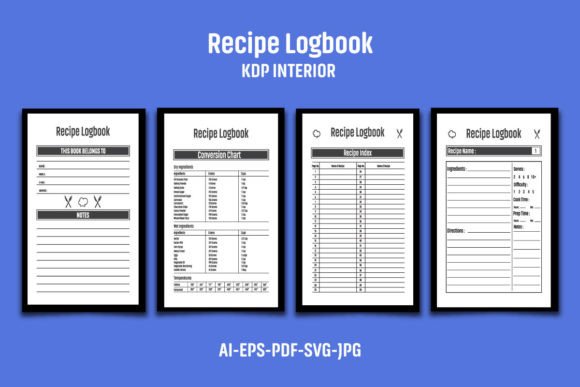
Think of it as a pre-built skeleton for a paperback book. This particular interior comes in an 8″x10″ format with bleed, meaning the pages extend slightly beyond the final trim to prevent white edges when printed. The files include AI, EPS, PDF, JPG, and SVG versions, all at 300 DPI, so they’re sharp enough for professional printing. With 110 black-and-white pages, the logbook gives enough room for dozens of recipes while staying lightweight and affordable to produce. What makes it especially flexible is its easy color-change feature—you can modify the design’s accent colors to match a brand or personal aesthetic without rebuilding the layout. Since it’s made for Amazon KDP, the dimensions (8.12 x 10.25 inches overall) already account for standard trim and bleed requirements, cutting out the guesswork for first-time publishers.
When a Ready-Made Interior Becomes a Lifesaver
Most people underestimate the technical side of self-publishing. KDP has strict guidelines for margins, gutters, and bleed, and even small missteps can get a book rejected. A Recipe Logbook KDP Interior handles all of that upfront. But beyond compliance, it shines in situations where speed and simplicity matter. Picture a parent compiling a school fundraiser cookbook with contributions from dozens of families. Instead of designing a layout from scratch, they can drop in content, adjust a few colors, and have a print-ready file in an afternoon. For a food blogger launching a digital product, the same interior can become a lead magnet—something tangible to offer subscribers. The file structure (fully editable AI and EPS versions) also means you can repurpose the layout for different series, like a sourdough bread logbook, a cocktail recipe journal, or a weekly meal planner.
Different Audiences, Entirely Different Outcomes
The beauty of a template like this is how it adapts to wildly different goals. Here are a few real-world pathways that show its range.
Family Historians and Heirloom Builders
You might have a box of yellowed index cards covered in your grandmother’s handwriting. Transcribing those into a digital file is step one; giving them a clean, respectful home is step two. A recipe logbook interior provides a consistent, elegant framework where each recipe gets the same care and presentation. Because the pages are black and white, they print cost-effectively, which matters when you want to order multiple copies for siblings and cousins. Some users scan the original handwritten cards and place them alongside typed versions, creating a hybrid that feels both modern and deeply personal.
Professional Chefs and Culinary Instructors
In a cooking school environment, consistency is key. A chef can take this interior, add the school’s logo and color palette, and produce a uniform recipe manual for every student. The 8″x10″ format gives enough space for ingredient lists, step-by-step instructions, and even notes on technique or plating. Because the PDF is 300 DPI, small text and fine details stay legible. Instructors often leave intentional blank notes sections—something the grid-like layout supports easily—so students can add their own observations during hands-on sessions. It moves beyond a disposable handout and becomes a keepsake that students actually use in their home kitchens.
Wellness Coaches and Dietitians
Nutrition professionals often blend recipes with tracking elements. A recipe logbook interior can be customized to include space for macronutrient counts, prep time, or dietary tags like gluten-free or vegan. A wellness coach helping clients with meal prep might print a coil-bound version of the logbook and use it during one-on-one sessions. The ability to change accent colors is surprisingly powerful here: a calm sage green for a holistic health coach, a vibrant orange for a sports nutritionist—subtle branding that reinforces the professional’s identity without heavy design work.
Low-Content Publishers Testing New Niches
For KDP entrepreneurs, speed to market matters. A Recipe Logbook KDP Interior eliminates the design bottleneck. If you’re experimenting with specialized niches—say, a keto slow-cooker journal or a plant-based baby food log—you can take the base file, tweak the headings and chapter pages, and launch a series quickly. The 110-page count strikes a balance: long enough to feel substantial, short enough to keep printing costs low, which translates to better royalties. One publisher might use it as a blank recipe book; another might fill half the pages with prompts and tips, creating a hybrid guided journal. The EPS and AI files allow deep customization, so you’re not locked into a single format.
Observations from Real Use Cases
When someone first downloads the ZIP file containing all the formats, the immediate task is extracting it—something as simple as a double-click if your system handles it, or using WinZIP or WinRAR. Inside, the JPG files offer a quick preview, while the AI and EPS versions are your design playground. A common practice is to open the AI file, place your own logo or graphic on the title page (and often a small credit on the interior pages), and then resave the PDF to KDP specs. This extra step is crucial: Amazon actively checks for duplicate content, and adding a unique logo or graphic prevents potential flags. Think of the base file as a canvas, not a finished product. The note that “the images, text, and mockups are not included” is important—the product presentation shows you what it can become, but you’re buying the blank structure, which is exactly what you need to create something original.
Another observation from regular use: the 8″x10″ trim size feels generous without being unwieldy. It opens flat on a kitchen counter—a real concern for anyone who cooks from a book. The bleed ensures that any background elements that stretch to the edge don’t get clipped, but because it’s black and white by default, you avoid color printing upcharges. When someone does want to add color, they appreciate that the source files make it straightforward to shift all black elements to a dark navy or charcoal, creating a softer look while still avoiding full-color printing costs.
Strengths and Honest Limitations
The clearest strength is that it removes the technical overwhelm of KDP file setup. Even if you’ve never designed a book interior, the 300 DPI, bleed-included, pre-measured files are ready for upload after minor tweaks. The file diversity means you aren’t stuck if you only have access to free software; the SVG can be edited in Inkscape, the PDF in some online editors, and the EPS in older programs. The black-and-white high-resolution interior prints cleanly on standard paper, making the final product feel professional rather than DIY.
There are limitations to keep in mind. This interior is a template, not a full book. You must bring your own content, and the learning curve for editing AI or EPS files can be steep if you’ve never used Adobe Illustrator. While the files are CS6 compatible, some newer design tools might not handle older EPS formats perfectly, so testing is wise. Also, the 110-page count is fixed—you can’t magically add pages to a PDF without rebuilding, though you can duplicate or delete pages in a PDF editor. Because the product comes as a ZIP, anyone not comfortable with file extraction might hit an early snag, though most devices handle it natively now.
Practical Considerations Before You Choose
Before integrating a Recipe Logbook KDP Interior into your workflow, think through a few points. First, know your audience’s preferences. If you’re targeting buyers who want colorful, photo-heavy cookbooks, a black-and-white interior might not fit. In that case, you’d need to heavily modify the file to add full-color backgrounds, which increases printing costs and complexity. Second, plan your cover design alongside the interior. The 8.12 x 10.25 overall dimension guides your cover template; mismatched sizes are a common rejection reason. Third, consider how you’ll handle the “add your logo” advice. A simple text-based logo on the title page often satisfies originality checks, but a more integrated design—like a subtle watermark repeated on recipe pages—can elevate the book’s perceived value while protecting against content flags. Fourth, test print a proof copy before publishing. What looks perfectly centered on screen might shift slightly due to binding, and catching that early saves bad reviews.
One often-overlooked benefit is that the interior’s redundant file formats future-proof your investment. If you ever lose access to Adobe software, the SVG and PDF versions remain usable in open-source alternatives. The high-resolution JPGs can even serve as placeholder backgrounds in simpler design programs for someone who just wants to add text boxes and move on. This flexibility means the interior stays useful beyond a single book—it can become the base for an entire line of themed journals with minimal redesign.
Ultimately, the real value of this product sits in its ability to compress weeks of trial-and-error into an afternoon of personalization. It respects the craft of cooking by giving recipes a dignified home, and it respects the business of publishing by aligning with Amazon KDP’s exacting standards. Whether you’re capturing grandma’s secret pie crust or building a passive income stream from low-content books, that starting point—clean, adaptable, and print-ready—makes all the difference.